GitHub Actions CI/CD là nền tảng tự động hóa tích hợp sẵn trong GitHub, cho phép lập trình viên xây dựng quy trình build, test, deploy ngay trong repository mà không cần máy chủ riêng. Bài viết này hướng dẫn chi tiết cách thiết lập pipeline CI/CD hoàn chỉnh từ A đến Z.
Tại sao chọn GitHub Actions cho CI/CD?
GitHub Actions mang lại lợi thế lớn so với các giải pháp CI/CD truyền thống như Jenkins, GitLab CI, hay CircleCI:
- Tích hợp nguyên sinh: Chạy ngay trong GitHub, không cần cấu hình webhook hay server riêng
- Miễn phí cho public repo: 2.000 phút/tháng cho private repo, không giới hạn cho public
- Marketplace lớn: Hơn 10.000 actions có sẵn (Docker, AWS, Terraform, Slack, v.v.)
- Matrix builds: Test đa phiên bản Node, Python, Java, OS cùng lúc
- Secrets management: Lưu trữ an toàn API key, token deploy qua GitHub Secrets
Phần 1: Cấu trúc file workflow
Mọi pipeline GitHub Actions đều định nghĩa trong thư mục .github/workflows/ với đuôi .yml hoặc .yaml. Cấu trúc cơ bản:
name: CI/CD Pipeline

on:
  push:
    branches: [main, develop]
  pull_request:
    branches: [main]

jobs:
  build:
    runs-on: ubuntu-latest
    steps:
      - uses: actions/checkout@v4
      - name: Setup Node.js
        uses: actions/setup-node@v4
        with:
          node-version: '20'
      - run: npm ci
      - run: npm test
      - run: npm run build
Giải thích các trường quan trọng
| Trường | Chức năng |
|---|---|
on | Kích hoạt workflow: push, pull_request, schedule, workflow_dispatch, release |
jobs | Định nghĩa các công việc chạy song song hoặc tuần tự |
runs-on | Môi trường runner: ubuntu-latest, windows-latest, macos-latest, self-hosted |
steps | Các bước thực hiện trong job: uses (action có sẵn) hoặc run (lệnh shell) |
needs | Phụ thuộc job: job B chạy sau khi job A thành công |
Phần 2: Pipeline thực tế cho dự án Node.js/TypeScript
Dưới đây là workflow hoàn chỉnh cho dự án hiện đại với lint, test, build, và deploy:
name: Node.js CI/CD

on:
  push:
    branches: [main, develop]
  pull_request:
    branches: [main]

env:
  NODE_VERSION: '20.x'
  REGISTRY: ghcr.io
  IMAGE_NAME: ${{ github.repository }}

jobs:
  lint-and-test:
    name: Lint & Test
    runs-on: ubuntu-latest
    steps:
      - name: Checkout code
        uses: actions/checkout@v4

      - name: Setup Node.js
        uses: actions/setup-node@v4
        with:
          node-version: ${{ env.NODE_VERSION }}
          cache: 'npm'

      - name: Install dependencies
        run: npm ci

      - name: Run ESLint
        run: npm run lint

      - name: Run TypeScript type check
        run: npm run typecheck

      - name: Run unit tests
        run: npm run test:unit -- --coverage

      - name: Upload coverage
        uses: codecov/codecov-action@v4
        with:
          files: ./coverage/lcov.info

  build-and-push:
    name: Build & Push Docker Image
    needs: lint-and-test
    if: github.event_name == 'push' && github.ref == 'refs/heads/main'
    runs-on: ubuntu-latest
    permissions:
      contents: read
      packages: write
    steps:
      - name: Checkout code
        uses: actions/checkout@v4

      - name: Set up Docker Buildx
        uses: docker/setup-buildx-action@v3

      - name: Log in to Container Registry
        uses: docker/login-action@v3
        with:
          registry: ${{ env.REGISTRY }}
          username: ${{ github.actor }}
          password: ${{ secrets.GITHUB_TOKEN }}

      - name: Extract metadata
        id: meta
        uses: docker/metadata-action@v5
        with:
          images: ${{ env.REGISTRY }}/${{ env.IMAGE_NAME }}
          tags: |
            type=ref,event=branch
            type=sha,prefix=
            type=raw,value=latest,enable={{is_default_branch}}

      - name: Build and push
        uses: docker/build-push-action@v5
        with:
          context: .
          push: true
          tags: ${{ steps.meta.outputs.tags }}
          labels: ${{ steps.meta.outputs.labels }}
          cache-from: type=gha
          cache-to: type=gha,mode=max
Phần 3: Kỹ thuật nâng cao
1. Matrix Strategy – Test đa môi trường
jobs:
  test:
    runs-on: ${{ matrix.os }}
    strategy:
      matrix:
        os: [ubuntu-latest, windows-latest, macos-latest]
        node-version: ['18.x', '20.x', '22.x']
        include:
          - os: ubuntu-latest
            node-version: '22.x'
            experimental: true
    steps:
      - uses: actions/checkout@v4
      - uses: actions/setup-node@v4
        with:
          node-version: ${{ matrix.node-version }}
      - run: npm ci && npm test
2. Cache dependencies – Tăng tốc build
- name: Cache node_modules
  uses: actions/cache@v4
  with:
    path: ~/.npm
    key: ${{ runner.os }}-node-${{ hashFiles('**/package-lock.json') }}
    restore-keys: |
      ${{ runner.os }}-node-
3. Conditional deployment – Chỉ deploy khi test pass
deploy:
  needs: [lint-and-test, build-and-push]
  if: github.ref == 'refs/heads/main' && github.event_name == 'push'
  runs-on: ubuntu-latest
  steps:
    - name: Deploy to Kubernetes
      uses: azure/k8s-deploy@v4
      with:
        manifests: |
          k8s/deployment.yaml
          k8s/service.yaml
        images: ${{ env.REGISTRY }}/${{ env.IMAGE_NAME }}:${{ github.sha }}
        kubectl-version: 'latest'
4. Reusable workflows – Tái sử dụng giữa các repo
Tạo .github/workflows/reusable-ci.yml:
name: Reusable CI

on:
  workflow_call:
    inputs:
      node-version:
        required: false
        type: string
        default: '20.x'
    secrets:
      NPM_TOKEN:
        required: true

jobs:
  ci:
    runs-on: ubuntu-latest
    steps:
      - uses: actions/checkout@v4
      - uses: actions/setup-node@v4
        with:
          node-version: ${{ inputs.node-version }}
          registry-url: 'https://registry.npmjs.org'
      - run: npm ci
      - run: npm test
      - run: npm publish
        env:
          NODE_AUTH_TOKEN: ${{ secrets.NPM_TOKEN }}
Gọi từ repo khác:
jobs:
  call-reusable:
    uses: org/repo/.github/workflows/reusable-ci.yml@main
    with:
      node-version: '22.x'
    secrets:
      NPM_TOKEN: ${{ secrets.NPM_TOKEN }}
Phần 4: Quản lý Secrets và Environments
Không bao giờ hardcode credentials trong workflow. Sử dụng:
- Repository Secrets: Settings → Secrets and variables → Actions → New repository secret
- Environment Secrets: Settings → Environments → production/staging → Add secret
- Organization Secrets: Dùng chung cho nhiều repo trong tổ chức
Ví dụ deploy với environment protection rules:
deploy-production:
  needs: build
  environment: production
  runs-on: ubuntu-latest
  steps:
    - name: Deploy
      run: ./deploy.sh
      env:
        AWS_ACCESS_KEY_ID: ${{ secrets.AWS_ACCESS_KEY_ID }}
        AWS_SECRET_ACCESS_KEY: ${{ secrets.AWS_SECRET_ACCESS_KEY }}
        KUBECONFIG: ${{ secrets.KUBECONFIG_PROD }}
Phần 5: Monitoring và Debug
Xem log chi tiết
Mỗi run hiển thị log real-time. Bật debug logging bằng secret ACTIONS_STEP_DEBUG: true hoặc ACTIONS_RUNNER_DEBUG: true.
Artifact upload/download
- name: Upload build artifacts
  uses: actions/upload-artifact@v4
  with:
    name: dist-files
    path: dist/
    retention-days: 7

- name: Download artifacts in deploy job
  uses: actions/download-artifact@v4
  with:
    name: dist-files
    path: dist/
Slack/Telegram notification
- name: Notify Slack
  if: always()
  uses: 8398a7/action-slack@v3
  with:
    status: ${{ job.status }}
    channel: '#deployments'
    text: "Deploy ${{ job.status }} - ${{ github.repository }}@${{ github.sha }}"
  env:
    SLACK_WEBHOOK_URL: ${{ secrets.SLACK_WEBHOOK }}
Phần 6: Best Practices tổng kết
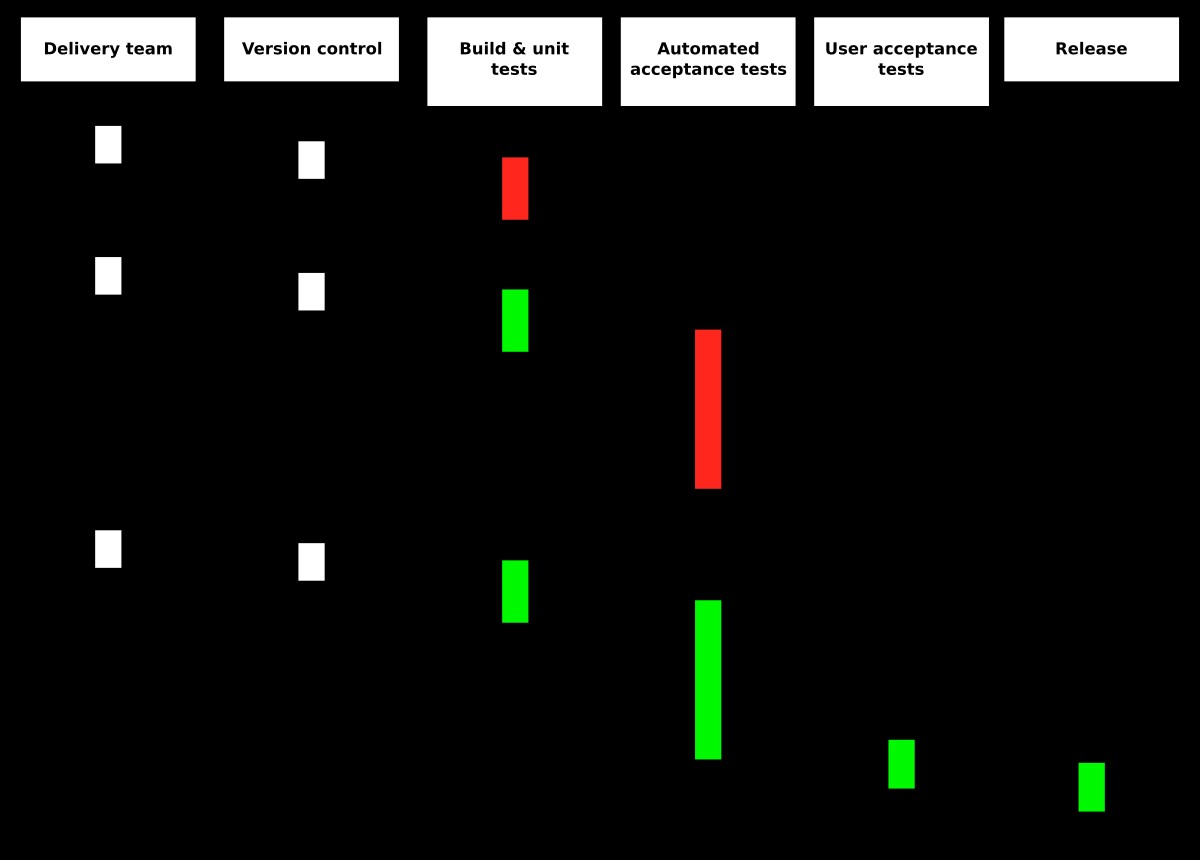
- Tách job nhỏ: Mỗi job làm một việc (lint, test, build, deploy) → dễ debug, chạy song song
- Dùng actions chính thức:
actions/checkout,actions/setup-node,docker/*actions được maintain bởi GitHub/Docker - Pin version action: Luôn dùng
@v4thay vì@mainđể tránh breaking change - Cache agresively: npm, Maven, Gradle, Docker layer cache tiết kiệm 50-80% thời gian
- Fail fast:
fail-fast: truetrong matrix để dừng sớm khi một combo fail - Concurrency control: Hủy run cũ khi push mới lên cùng branch
concurrency:
  group: ${{ github.workflow }}-${{ github.ref }}
  cancel-in-progress: true
Kết luận
GitHub Actions CI/CD cung cấp giải pháp hoàn chỉnh, miễn phí cho hầu hết nhu cầu tự động hóa. Với marketplace phong phú, matrix builds, reusable workflows, và tích hợp sâu với GitHub, nó là lựa chọn số một cho các team phát triển hiện nay. Hãy bắt đầu với workflow đơn giản (lint + test), sau đó mở rộng thêm build, deploy, notification theo nhu cầu dự án.
Tham khảo thêm:
- GitHub Actions Documentation: https://docs.github.com/en/actions
- Actions Marketplace: https://github.com/marketplace?type=actions
- Awesome Actions list: https://github.com/sdras/awesome-actions