WebGPU Là Gì?
WebGPU là API đồ họa và compute thế hệ mới trên trình duyệt, thay thế WebGL. Khác với WebGL kế thừa OpenGL ES (dựa trên immediate mode), WebGPU lấy cảm hứng từ Vulkan, Metal, DirectX 12 — cung cấp low-overhead rendering, explicit resource management, và compute shaders mạnh mẽ. Chrome 113 (tháng 5/2023) chính thức hỗ trợ WebGPU stable, Firefox và Safari lần lượt hỗ trợ từ 2024-2025.
Tại Sao WebGPU Thay Thế WebGL?
WebGL đã phục vụ tốt 10 năm nhưng bị giới hạn bởi thiết kế cũ:
- Overhead cao: Mỗi draw call qua GL driver có hàng trăm microsecond overhead, WebGPU giảm 10x.
- Không có compute: WebGL chỉ rendering, WebGPU hỗ trợ GPGPU (general-purpose compute on GPU).
- Resource binding tường minh: WebGL auto-manages state, gây overhead. WebGPU yêu cầu developer khai báo resource binding rõ ràng — giống Vulkan/Metal.
- Shader language chuẩn: WebGL dùng GLSL (dịch sang SPIR-V/WGSL). WebGPU dùng WGSL (WebGPU Shading Language) native.

Kiến Trúc WebGPU Pipeline
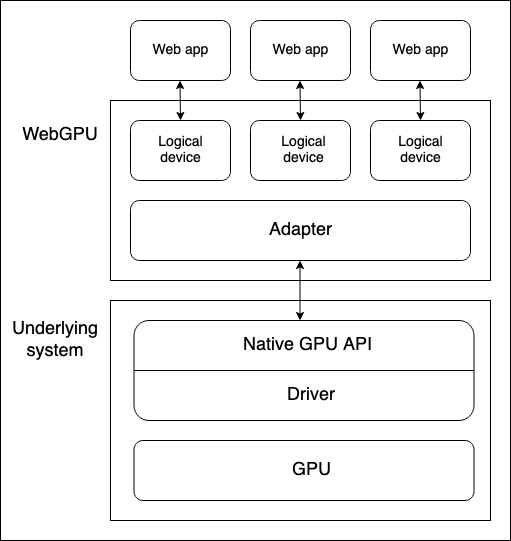
WebGPU hoạt động theo mô hình explicit render pass:
// Tạo adapter (GPU device)
const adapter = await navigator.gpu.requestAdapter();
const device = await adapter.requestDevice();

// Định nghĩa shader WGSL
const shaderCode = `
@vertex
fn vs(@builtin(vertex_index) i: u32) -> @builtin(position) vec4f {
  let pos = array(vec2f(-0.5,-0.5), vec2f(0.5,-0.5), vec2f(0.0,0.5));
  return vec4f(pos[i], 0.0, 1.0);
}
@fragment
fn fs() -> @location(0) vec4f {
  return vec4f(1.0, 0.5, 0.2, 1.0);
}
`;
Tính Năng Mạnh Mẽ Của WebGPU
Compute Shaders
WebGPU cho phép chạy code arbitrary trên GPU — không giới hạn rendering. Ứng dụng: physics simulation, image processing, ML inference, cryptography.
// Compute pass cho particle simulation
const computePass = commandEncoder.beginComputePass();
computePass.setPipeline(particlePipeline);
computePass.setStorageBuffer(0, particleBuffer);
computePass.dispatchWorkgroups(64, 64);
computePass.end();
Ray Tracing Real-time
Với WebGPU, trình duyệt có thể chạy ray tracing cơ bản ở 30-60 FPS mà không cần plugin. Các engine như Three.js đã hỗ trợ WebGPU backend.
Machine Learning Trình Duyệt
WebGPU compute enable on-device ML inference. Transformers.js, ONNX Runtime Web dùng WebGPU để chạy LLM, Stable Diffusion trực tiếp trên trình duyệt — không cần server. Ví dụ: chạy Stable Diffusion 1.5 (~900M params) trên laptop cỡ mid-range, mỗi image generation 3-5 giây thay vì 20+ giây trên CPU. Transformers.js WebGPU guide cho thấy cách tải và inference model với chỉ 50 dòng JavaScript.
Cài Đặt WebGPU Trong Firefox
Firefox 128+ hỗ trợ WebGPU nhưng cần flag:
- about:config →
dom.webgpu.enabled→true - Limitations: Chưa hỗ trợ indirect draw, buffer binding arrays.
So Sánh WebGPU vs WebGL vs Vulkan
| Feature | WebGL 2.0 | WebGPU | Vulkan |
|---|---|---|---|
| Platform | Trình duyệt | Trình duyệt | Desktop/Mobile |
| API Style | State machine | Explicit | Explicit |
| Compute Shaders | Không | Có | Có |
| Draw Call Overhead | ~100μs | ~10μs | ~5μs |
| Shader Language | GLSL/SPIR-V | WGSL | GLSL/SPIR-V |
| Memory Control | Implicit | Explicit | Explicit |
| Learning Curve | Thấp | Trung bình | Cao |
Hướng Dẫn Bắt Đầu With Three.js WebGPU
Three.js từ phiên bản 0.163+ hỗ trợ WebGPU renderer chính thức:
import * as THREE from 'three';
import { WebGPURenderer } from 'three/addons/renderers/webgpu/WebGPURenderer.js';

const scene = new THREE.Scene();
const camera = new THREE.PerspectiveCamera(75, innerWidth/innerHeight, 0.1, 100);
const renderer = new WebGPURenderer({ antialias: true });
renderer.setSize(innerWidth, innerHeight);
document.body.appendChild(renderer.domElement);

const geometry = new THREE.BoxGeometry();
const material = new THREE.MeshStandardMaterial({ color: 0x00ff88 });
const cube = new THREE.Mesh(geometry, material);
scene.add(cube);
camera.position.z = 2;

function animate() {
  requestAnimationFrame(animate);
  cube.rotation.x += 0.01;
  cube.rotation.y += 0.01;
  renderer.render(scene, camera);
}
Hạn Chế Hiện Tại Của WebGPU
- Firefox hỗ trợ muộn: Firefox 128+ mới hỗ trợ WebGPU basic, một số tính năng còn thiếu.
- Safari incomplete: Safari 18 hỗ trợ nhưng thiếu 몇 compute features.
- No 2D Canvas API: WebGPU Canvas 2D backend đang trong development.
- Debug khó: Shader error message WGSL khó đọc hơn GLSL.
- Mobile support: iOS 17+ Safari hỗ trợ nhưng Android Chrome cần WebGPU flag ở một số thiết bị.
WebGPU Trong Thực Tế: Hiệu Suất Thực Tế
Benchmark từ GPU for the Web cho thấy WebGPU trên M2 MacBook Air đạt ~8.2 GFLOPS FP32, tương đương RTX 3060 Mobile. Trình duyệt Chrome 121 trên Snapdragon X Elite đạt 5.4 GFLOPS — đủ cho ML inference real-time trên mobile.
Điểm khác biệt lớn so với WebGL: WebGPU giữ nguyên state giữa các frame mà không cần re-upload buffers. Ví dụ: render scene 1000 mesh, WebGL phải re-bind mỗi frame (~3ms overhead), WebGPU chỉ cần binding một lần, frame 2-1000 chỉ cần draw call (~0.02ms mỗi). Điều này đưa draw call overhead từ 300ms xuống còn 20ms cho scene phức tạp.

Ứng Dụng Thực Tế Nên Chọn WebGPU
Chọn WebGPU cho: game 3D hiệu suất cao trên web, visualization dữ liệu lớn (biểu đồ 1M+ điểm), ML inference on-device, creative coding (generative art). Tiếp tục dùng WebGL cho: project cần hỗ trợ IE/old browser, 2D canvas game đơn giản.
Năm 2025-2026: WebGPU đang ở điểm chuyển mình. Chrome 135+ cải thiện stability, Firefox/WebKit tiếp cận feature parity. WebGPU nhiều khả năng thay thế hoàn toàn WebGL trong 2-3 năm tới. Tham khảo MDN WebGPU Guide và W3C WebGPU Specification.
Nguồn Tham Khảo
WebGPU do GPU for the Web group phát triển. Chrome implementation dựa trên Chrome Platform Status. Three.js WebGPU docs tại threejs.org. WGSL specification trên W3C.