WebGPU là gì? Đột phá đồ họa và compute trên trình duyệt
WebGPU là API web mới cho phép developer truy cập trực tiếp GPU (Graphics Processing Unit) của thiết bị để thực hiện render đồ họa hiệu năng cao và general-purpose GPU compute (GPGPU) ngay trong trình duyệt. Là người kế thừa của WebGL, WebGPU mang lại kiến trúc hiện đại tương thích với native GPU API (Vulkan, Metal, Direct3D 12), hỗ trợ song song cả render và compute shader.
Tại sao cần WebGPU khi đã có WebGL?
WebGL (dựa trên OpenGL ES 2.0) đã cách mạng hóa web graphics từ 2011, nhưng có những hạn chế cơ bản:
- API cũ, không cập nhật: OpenGL không còn phát triển tính năng mới; Vulkan/Metal/D3D12 mới là hiện tại.
- Chỉ chuyên render: WebGL thiết kế cho vẽ hình; GPGPU (machine learning, physics, crypto) rất khó thực hiện.
- Driver overhead cao: Mỗi draw call tốn nhiều CPU validation, giới hạn số object render đồng thời.
- Shader language GLSL ES: Phức tạp, thiếu tính năng modern (compute shader, storage buffer, ray tracing).
WebGPU giải quyết tất cả: kiến trúc thấp hơn (lower-level), ít abstraction overhead, first-class compute support, shader language WGSL (WebGPU Shading Language) modern.
Kiến trúc WebGPU: Từ hardware đến JavaScript
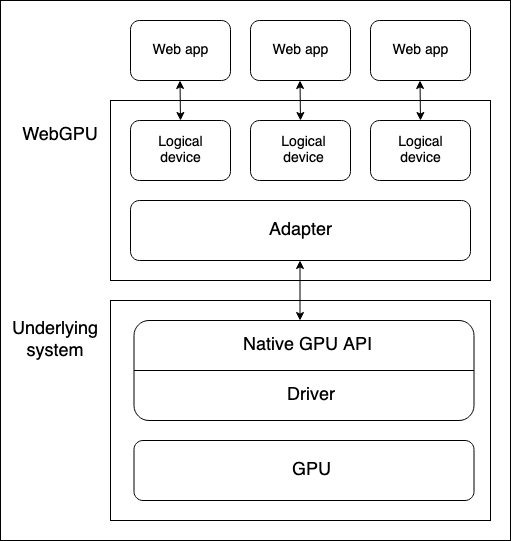
Có 4 lớp abstraction chính:
- Physical GPU: Integrated (chia sẻ RAM với CPU), Discrete (VRAM riêng), hoặc Software renderer.
- Native GPU API (OS level): Metal (Apple), Direct3D 12 (Windows), Vulkan (Linux/Android). Browser WebGPU implementation dùng driver này.
- GPUAdapter: Đại diện cho một physical GPU + driver khả dụng. Mỗi adapter có features/limits riêng.
- GPUDevice (Logical Device): Abstraction compartmentalized cho một web app. Một physical GPU serve nhiều web app đồng thời — mỗi app có GPUDevice riêng cho security và logic isolation.
Khởi tạo WebGPU (Code mẫu)
async function initWebGPU() {
  if (!navigator.gpu) {
    throw new Error('WebGPU not supported');
  }

  // 1. Request adapter (có thể chọn high-performance hoặc low-power)
  const adapter = await navigator.gpu.requestAdapter({
    powerPreference: 'high-performance' // hoặc 'low-power'
  });
  if (!adapter) throw new Error('No WebGPU adapter');

  // 2. Request logical device với features/limits mong muốn
  const device = await adapter.requestDevice({
    requiredFeatures: ['texture-compression-bc'], // ví dụ feature
    requiredLimits: { maxTextureDimension2D: 8192 }
  });

  // 3. Xử lý lost device (GPU reset, driver crash...)
  device.lost.then(info => {
    console.log('WebGPU device lost:', info.reason);
    // Re-init ở đây
  });

  return { adapter, device };
}
Render Pipeline vs Compute Pipeline
WebGPU có 2 loại pipeline chính, mỗi loại phục vụ mục đích khác:
Render Pipeline (Đồ họa)
Dùng để vẽ hình lên qua GPUCanvasContext. Cấu trúc:
- Vertex Shader: Xử lý vertex (position, normal, UV…).
- Fragment Shader: Tính màu pixel.
- Render Pass: Mô tả render target (color attachment, depth/stencil).
- Bind Groups: Truyền resource (buffer, texture, sampler) vào shader.
Compute Pipeline (Tính toán song song)
Dùng cho GPGPU: machine learning inference, physics simulation, image processing, crypto mining, data processing. Không có vertex/fragment — chỉ có Compute Shader với workgroup 3D (x, y, z).
// Compute pipeline cơ bản
const computePipeline = device.createComputePipeline({
  layout: 'auto',
  compute: {
    module: device.createShaderModule({ code: computeShaderWGSL }),
    entryPoint: 'main'
  }
});

// Dispatch workgroups
const passEncoder = commandEncoder.beginComputePass();
passEncoder.setPipeline(computePipeline);
passEncoder.setBindGroup(0, bindGroup);
passEncoder.dispatchWorkgroups(Math.ceil(N / 64)); // 64 threads/workgroup
passEncoder.end();
WGSL — WebGPU Shading Language
WGSL là ngôn ngữ shader chuẩn của WebGPU, thiết kế an toàn, dễ đọc, tương thích SPIR-V (Vulkan) và MSL (Metal). Đặc điểm chính:
- Cú pháp giống Rust (type inference, pattern matching, let/const).
- Hỗ trợ
varcho Storage Buffer (random access read/write). - Hỗ trợ
workgroupmemory cho chia sẻ dữ liệu trong workgroup. - Built-in:
textureLoad,textureStore,atomicAdd,subgroupoperations.
// WGSL Compute Shader ví dụ: vector add
@group(0) @binding(0) var a: array;
@group(0) @binding(1) var b: array;
@group(0) @binding(2) var out: array;

@compute @workgroup_size(64)
fn main(@builtin(global_invocation_id) id: vec3) {
  let i = id.x;
  if (i < arrayLength(&a)) {
    out[i] = a[i] + b[i];
  }
}
Tương thích trình duyệt (2025)
| Trình duyệt | Hỗ trợ | Ghi chú |
|---|---|---|
| Chrome 113+ | ✅ Default enabled | Windows, macOS, ChromeOS, Android |
| Edge 113+ | ✅ Default enabled | Cùng engine Chromium |
| Firefox 141+ | ⚠️ Behind flag | dom.webgpu.enabled trong about:config |
| Safari 17.4+ | ✅ Enabled | macOS Sonoma+, iOS 17.4+ (Metal backend) |
Compatibility Mode: WebGPU cung cấp featureLevel: 'compatibility' cho adapter chạy trên OpenGL ES 3.1 / D3D11 cũ hơn, nhưng với feature subset hạn chế.
Ứng dụng thực tế
1. Machine Learning trên trình duyệt (WebML)
Thư viện WebML, Transformers.js, ONNX Runtime Web dùng WebGPU compute shader để chạy inference LLM, Stable Diffusion, Whisper, YOLO… ngay client-side. Tốc độ nhanh 10-50x so với WASM/WebGL.
2. Game & 3D Web (Three.js, Babylon.js, PlayCanvas)
Các engine đã có WebGPU backend:
- Three.js r160+:
WebGPURenderer, hỗ trợ compute-based particles, post-processing. - Babylon.js 6.0+: WebGPU engine mặc định.
- PlayCanvas: Hỗ trợ WebGPU sớm.
3. Scientific Computing & Data Visualization
WebGPU cho phép xử lý dataset lớn (millions points) real-time: fluid simulation, n-body gravity, large-scale scatter plot, volume rendering.
4. Video & Image Processing
Compute shader thực hiện real-time: color grading, blur, sharpen, super-resolution, video codec (AV1 decode assist).
WebGPU vs WebGL vs WebAssembly (SIMD)
| Đặc điểm | WebGL 2 | WebAssembly SIMD | WebGPU |
|---|---|---|---|
| GPU Access | Chỉ render | Không (CPU) | Render + Compute |
| Shader Language | GLSL ES 3.0 | N/A | WGSL |
| Parallelism | Vertex/Fragment | CPU vector (128/256-bit) | Compute workgroup (hàng nghìn thread) |
| Memory Model | Uniform/Texture/SSBO hạn chế | Linear memory | Buffer/Texture/Storage Buffer linh hoạt |
| Overhead | Cao (driver validation) | Thấp (near-native) | Thấp (explicit, predictable) |
| ML Inference | Khó, chậm | OK (WASM NN) | Rất nhanh (tensor cores) |
Bắt đầu học WebGPU
- MDN WebGPU API — Tài liệu chính thức.
- WebGPU Fundamentals — Tutorial từ cơ bản đến nâng cao (Greg Tavares).
- WebGPU Spec (W3C) — Chuẩn kỹ thuật.
- webgpu.h — C header cho native embedding.
- Samples: WebGPU Samples, austinEng/webgpu-samples.
Kết luận
WebGPU không chỉ là “WebGL tốt hơn” — nó mở ra tận dụng GPU thực sự trên web: compute shader, storage buffer, pipeline tĩnh, bind group, multi-queue. Điều này biến trình duyệt thành platform khả thi cho ML inference, game AAA, scientific computing, video processing — những workload trước đây chỉ chạy native app. Với Chrome/Edge/Safari đã hỗ trợ rộng rãi, Firefox đang bật flag, năm 2025 là thời điểm WebGPU chuyển từ experimental sang production-ready. Developer web nên bắt đầu tìm hiểu và prototype ngay hôm nay.
Nguồn tham khảo: MDN WebGPU API | WebGPU Fundamentals | W3C WebGPU Spec | WebGPU W3C Recommendation